Egao

Camera cues to smile and pause

Egao reads your expression and posture through the camera as you work and invites you to 15–20 second routines. Video is processed only on your computer, never saved or sent.

macOS · Windows · Linux

Download
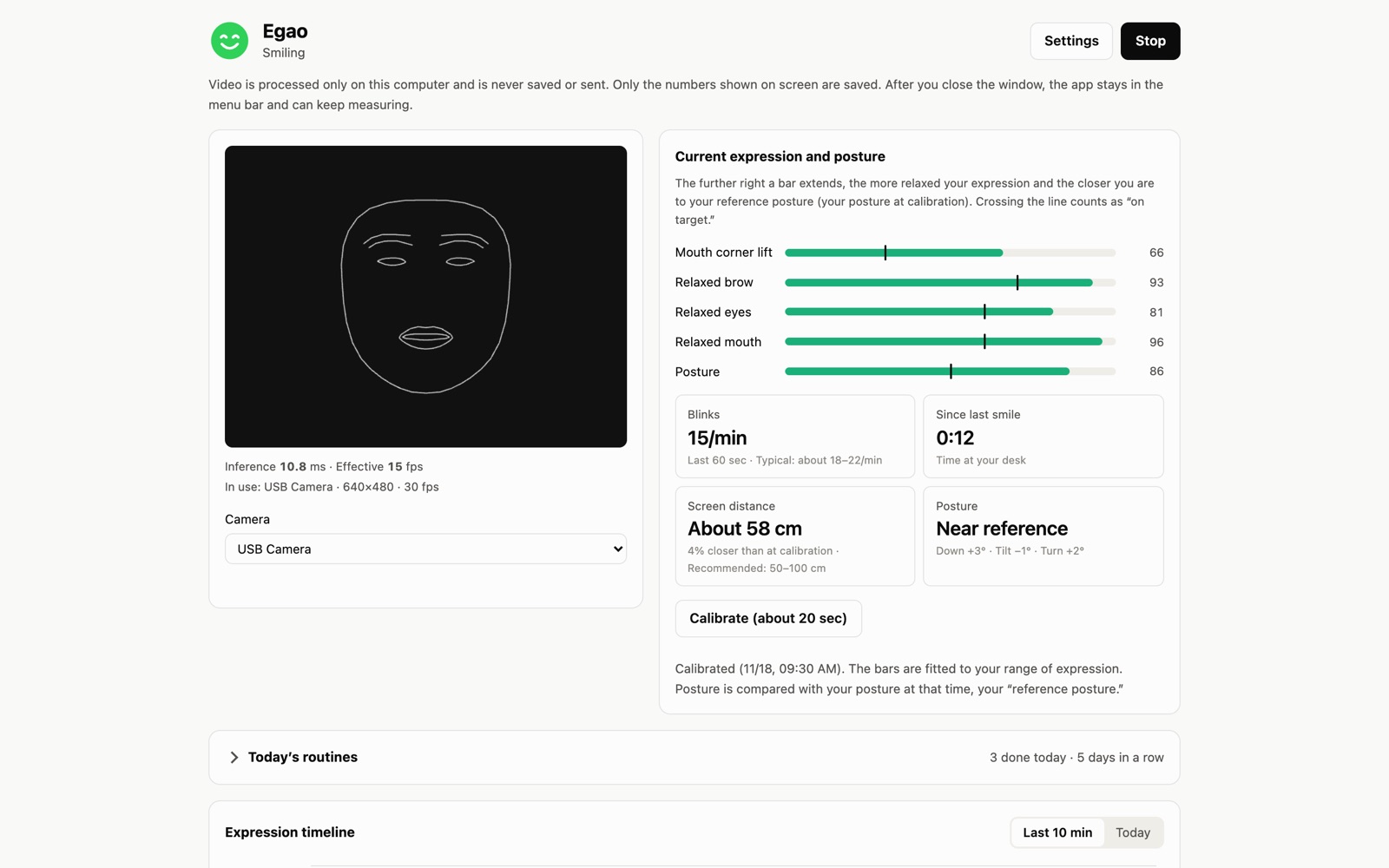
The Egao window: next to the camera view, bars show how far the corners of the mouth lift, how relaxed the brow, eyes and mouth are, and posture

Download

Mac

Coming soon to the Mac App Store

A Mac with Apple silicon, running macOS 14 or later

Windows Beta

Version 1.0.0Egao_1.0.0_x64-setup.exe · 15.7 MB

Windows 10 or 11 (64-bit)

The installer is not code-signed yet. If Windows shows a protection screen, choose “More info”, then “Run anyway”.

Linux Beta

Version 1.0.0Egao_1.0.0_amd64.deb · 25.7 MBEgao_1.0.0_amd64.AppImage · 98.7 MB

64-bit (x86_64). Ubuntu 24.04 or later, Debian 13 or later, and similar

Install the .deb with “sudo apt install ./<file name>”. For the AppImage, make it executable, then open it. The tray icon needs a desktop environment that supports AppIndicator.

  • A built-in or external camera
  • No account to create, and no ads.
  • The Windows and Linux versions are in beta. Waving to stop measuring and the sound cues are available only in the Mac version for now.
  • The Windows and Linux versions do not update automatically. To get a new version, install it again from this page.
File checksums (SHA-256)
Egao_1.0.0_x64-setup.exe
6ca502e186314f25631c3314bd6059cfbf222e284996ad651f84982b8fa42d83
Egao_1.0.0_amd64.deb
36a228c1af705c99442965a7dd0a5f67e7a9b55ea3ded4b81d793c5d2b6628ec
Egao_1.0.0_amd64.AppImage
5f4d8038a7765f623a6336381f37ef95284e9b4cf1fe6bfd58c3ec28a5f67269

What it does

Egao (Japanese for “smile”) is a desktop app that watches your expression and posture through the camera while you work at your computer, and offers you cues to smile and take a short break. When you’re focused on a screen, it’s easy to tense your brow, blink less, or lean forward. When that goes on for a while, Egao invites you to a short routine of about 15–20 seconds.

  • Current expression and postureBars show how far the corners of your mouth lift, how relaxed your brow, eyes and mouth are, and your posture. The more relaxed you are, the longer the bars.
  • CalibrationIn about 20 seconds, Egao measures your own range of expression and your “reference posture,” then fits the bars to you.
  • InvitesWhen you keep blinking less, your brow stays tense, or you stay away from your reference posture, a small invite appears at the top right of your screen. Just smile to start.
  • Today’s routines (6 in all)Face loosen-up, Eye reset, Neck stretch, Posture reset, Neck half-circles, and Mouth & voice. Follow the on-screen guide, and the routine moves along as the camera watches your movements.
  • Timeline and today’s summaryLook back at how your smiles, brow, blinking and posture changed over the last 10 minutes and over the day.
  • Stays in the menu bar or system trayEgao keeps measuring after you close the window. You can stop measuring or quit from there.

Your video never leaves your computer

  • Camera video is processed only on your computer. It is never saved or sent.
  • The only things stored are the numbers shown on screen (per-minute summaries) and your settings.
  • No account to create, and no ads.

The evidence, as it stands

The movements in the routines and the measurements are chosen on the basis of research and official guidance. “About the evidence” in the app lists the sources and separates what is known from what has not been verified. For example, the effect of doing a movement for as little as 15–20 seconds has not been studied, and whether the routines change how you look has not been verified. The app states these things plainly, too.

Please note

  • Egao is not a medical device. It is not intended to diagnose, treat or prevent any disease, and the numbers it shows are estimates only.
  • If you have pain, numbness or dizziness, or are receiving treatment for your neck, jaw or eyes, do not do the routines, and consult your doctor.